

In this article
If your customers read both Arabic and English, your website has to work properly in both. A bilingual website is not one website with a translation pasted on top. It is two complete experiences, one for Arabic readers and one for English readers, that share a brand, a structure and a maintenance routine. Done well, visitors never wonder which version is the “real” one. Done badly, you get mirrored layouts that break, phone numbers that jump to the wrong end of a sentence, an Arabic version that quietly goes out of date, and search engines that cannot tell which page belongs to which language.
This guide is for Saudi business owners who are deciding whether to build an Arabic and English website, or who already have one and want to know what good looks like. It explains the decisions that matter in plain language, the technical foundations behind them, and ends with a launch checklist you can hand to whoever builds your site. It is a planning guide, not a price list, and it makes no promises about rankings or results.
Quick answer
- Give each language its own URL. Google recommends separate URLs rather than switching language with cookies or browser settings.
- Keep each page in one language. Do not translate only the menu and footer.
- Design for right-to-left, do not just flip the page. Arabic needs a deliberately mirrored layout, suitable typography and care with mixed content such as phone numbers.
- Tell search engines how the versions relate. Use reciprocal hreflang annotations, and let each page’s canonical point to itself in its own language.
- Avoid forcing visitors into a language. Google advises against automatic redirects based on a guessed preference.
- Plan maintenance from day one. Every price, opening hour or service you change must be updated in both languages.
- Quality in both languages beats quantity in one.
Later in this guide, a short table separates what is a technical requirement from what is advice, because the two are easy to confuse.
Does your business need an Arabic and English website?
Arabic is the official language of Saudi Arabia, and many customers will prefer to read, search and enquire in Arabic. English matters too, particularly when your audience includes international clients, residents who read English more comfortably, suppliers, tourists or partners abroad. A well-built bilingual site lets each of them read, compare and ask questions in the language they are most comfortable with. It is worth serious consideration when:
- Your customers search in both languages. A salon or restaurant may find that some customers look for it in Arabic and others in English.
- You serve a mixed audience. A B2B service company may need Arabic for local decision-makers and English for international partners.
- You sell online. Product pages, delivery information, returns and checkout all have to work in whichever language the customer chooses.
- Your positioning depends on it. Some businesses want to show clearly that they serve both local and international customers.
It is not automatically the right first step. If you have limited time to produce and maintain content, one well-made language version can be a stronger start than two weak ones. What to avoid is the middle ground: a site with a language button that leads to only a handful of translated pages. Google suggests using a single language for the content and navigation of each page, and visitors feel the same way.
Which language should come first?
There is no universal answer. The right starting point depends on who actually decides to contact you. Use the table as a conversation starter, not a rule.
| Your situation | A sensible starting point |
|---|---|
| Local consumer business (salon, spa, nail studio, restaurant) with mostly Arabic-speaking customers | Complete the Arabic version first. Then add English for the pages that matter to international visitors: home, services or menu, contact and location. |
| Service company with local and international clients | Build the core pages in both languages from the start: home, services, about and contact. |
| Online store | Decide by catalogue size and customer base. A bilingual store involves product titles, descriptions, categories, checkout messages and emails, so it is the most demanding case. |
| Business aimed mainly at tourists or English-speaking residents | Complete English first, then add Arabic for the core pages so local customers are not excluded. |
Whichever you choose, prioritise the pages that generate enquiries rather than translating everything at once. An empty or half-finished Arabic page does more harm than no page, so never publish placeholders. If you are still deciding which pages a small business site needs at all, see What Pages Does a Small Business Website Need?.
Three illustrative scenarios
These are hypothetical examples to show how the decisions differ. They are not client projects.
- A nail studio in Riyadh. Most enquiries arrive from mobile phones, often through WhatsApp. The owner builds the Arabic version first, with services, how pricing works (as a policy, not a quote), location and a booking enquiry form, then adds English for the same core pages.
- A restaurant with several branches. The menu changes often, so the team needs a routine for updating both languages together. Without one, the English menu will drift out of date within weeks.
- A small online store. Product data, delivery information and order emails all need both languages. The owner starts with the best-selling categories rather than the whole catalogue and keeps the rest unpublished until it is translated properly.
What bilingual website design involves
“Bilingual” covers far more than text. A competent build deals with all of these layers, and the rest of this guide takes them in turn:
- Structure and URLs. One URL per language version and a clear relationship between each pair.
- Layout direction. Right-to-left (RTL) for Arabic and left-to-right (LTR) for English, mirrored deliberately.
- Typography. Arabic-capable fonts, tested at real sizes and matched visually with the Latin font.
- Content and localisation. Writing for each audience, not just converting words.
- Navigation and language switching. A visible, predictable way to change language.
- SEO. Titles and descriptions written for each language, hreflang, sitemaps and measurement.
- Forms and contact options. Labels, messages, validation and notification emails in the right language.
- Testing and maintenance. Checking both versions on real devices and keeping them in step.
Separate URLs for each language
Google’s documentation on managing multilingual sites recommends giving each language version its own URL instead of adjusting the language through cookies or browser settings. It lists country-specific domains, subdomains and subdirectories as options, and marks URL parameters (such as ?lang=ar) as not recommended.
For a typical small or medium business site, a subdirectory is usually the simplest to run: the English page at example.com/services/ and the Arabic page at example.com/ar/services/. It keeps both versions on one domain and one hosting account. Subdomains or separate domains can make sense for larger organisations with separate teams, but they add administration. The choice is practical. What matters is that each version has a stable address that visitors and search engines can reach.
Decide early how to handle slugs, the readable last part of a URL. Arabic words can be used in URLs, but they are percent-encoded when copied or shared, which makes links look long and messy. Many sites use readable Latin slugs for both languages with a consistent pattern, such as adding -ar to the Arabic version. Pick a policy, write it down, and apply it everywhere.
Language switching and visitor preferences
Make the language switcher easy to find on every page, and make it link to the equivalent page in the other language, not just the home page. A visitor reading your Arabic services page who taps “English” should land on your English services page.
Label each language in its own script, for example “العربية” and “English”, rather than relying on flags. A flag represents a country, not a language, and Saudi Arabia is not the only place where Arabic is spoken.
Automatic language redirects
It is tempting to detect a visitor’s browser language and send them straight to the matching version. Google advises avoiding automatic redirects of this kind, because they can prevent users and search engines from seeing all versions of your site. Googlebot usually crawls from the United States and sends no language preference, so Google may not find every variation of a site that decides the language dynamically. Visitors can be affected too: a Saudi resident using an English-language phone, or a traveller on a borrowed laptop, can end up in a language they did not choose.
Some multilingual plugins offer this as an optional setting. Polylang’s documentation, for example, describes an option that redirects a first-time visitor on the homepage to the language matching their browser, and explains how to turn it off. Treat it as a deliberate trade-off between convenience and discoverability, and discuss it with your developer. If any automatic behaviour stays, keep every language URL directly reachable and linked, keep the switcher visible, and test with a fresh browser profile and a different browser language. The simplest pattern is to let visitors land where they asked to land, keep the switcher obvious and, if you want to help, show a small dismissible suggestion such as “This page is also available in Arabic”.
RTL and LTR layouts
Arabic is written right to left, and a good Arabic layout is a mirror, not a translation. Reading order, alignment, navigation, form layouts and many icons reverse. Treat this as a design task from the start, not as a CSS patch at the end.
- Declare the direction in the page markup. The W3C advises setting
dir="rtl"on thehtmlelement of right-to-left pages, together with the correct language, for example<html lang="ar" dir="rtl">. Direction belongs in markup rather than only in CSS, so it still makes sense if the stylesheet fails to load. - Use logical CSS properties. Properties such as
margin-inline-startinstead ofmargin-leftadapt automatically when direction changes, which makes layouts easier to maintain. - Mirror what implies direction; keep what does not. Back and next arrows, progress indicators, sliders and “read more” arrows should reverse. Logos, clocks, play buttons and most illustrations usually should not.
- Do not simply flip images. Photographs and graphics that contain text or directional cues often look wrong when mirrored. Prepare separate versions where it matters.
- Check tables and forms. Column order and alignment follow the text direction, so test them in both languages.

Mixed-direction content
Real pages mix scripts constantly: a phone number inside an Arabic sentence, an English brand name in an Arabic heading, a product code in a menu. The bidirectional text algorithm can place punctuation or numbers in surprising positions, so check these cases on purpose.
| Content | What can go wrong | What to do |
|---|---|---|
| Phone numbers such as +966 5X XXX XXXX | The plus sign or digit groups jump to the wrong end of a line | Keep the number as one unit and test it in the Arabic layout |
| English brand or product names inside Arabic text | Surrounding punctuation lands on the wrong side | Test each occurrence; isolate inline text of uncertain direction with markup such as bdi |
| Email addresses and URLs | They run left to right and can look scrambled in an RTL line | Show them on their own line or as links |
| Form fields where users may type either language | Text aligns to the wrong edge | Use dir="auto" on fields where the direction cannot be predicted, as the W3C suggests |
Arabic typography, numbers and dates
Fonts are one of the clearest quality signals on an Arabic page. The points below are practical guidance rather than formal standards, so always test them with your own fonts and content.
- Choose a font designed for Arabic and test it at real sizes. Do not rely on whatever the browser falls back to. Check body text, headings, buttons, small labels and long paragraphs.
- Match the Arabic and Latin typefaces visually. At the same nominal size, two scripts can differ noticeably in weight and height, so compare them side by side and adjust if needed.
- Give Arabic text room. Test line height carefully; Arabic often needs more generous line spacing than Latin text at the same size.
- Avoid letter-spacing on Arabic. Arabic letters join, and artificial tracking can break the connections between them.
- Avoid Latin-style treatments such as uppercase and slanted (italic) styling. Arabic has no natural equivalent.
- Keep performance in mind. Each extra font file adds weight, so load only the weights you actually use.
Numbers, currency and dates
Decide deliberately whether the Arabic version uses Western digits (0–9), Eastern Arabic-Indic digits (٠–٩) or a considered mix, then apply the choice consistently in prices, phone numbers and dates. Unplanned mixing looks careless. Show currency the way your audience expects (for example SAR or ر.س), and decide whether Hijri dates are useful alongside Gregorian ones. Ask a native reader from your target market to review these choices.
WordPress and Polylang
WordPress itself publishes in one language at a time, so a bilingual WordPress site needs a multilingual plugin or setup. Polylang is one widely used option; others exist, including other plugins and multisite setups, and the right choice depends on your content, budget and who will maintain the site. According to Polylang’s published documentation:
- Right-to-left scripts are supported.
- The language can be set by a language code in the URL, or by a separate subdomain or domain per language.
- The free plugin covers translating posts, pages, media, categories, tags, custom post types and taxonomies, and classic menus and widgets. The documentation also describes a strings panel for items such as the site title, tagline and widget text.
- Machine translation with DeepL is a feature of Polylang Pro, not of the free plugin.
- Translating slugs is documented as needing Polylang Pro.
- WooCommerce stores need a separate premium add-on, Polylang for WooCommerce, for the two plugins to work together.
Read that list as information for comparing quotes and options, not as a recommendation to buy anything. A bilingual marketing site can be built and maintained well without machine translation, and this guide recommends human-written Arabic anyway. If you run a store, ask your developer which approach they will use for products and what it costs to run.
If your site uses a page builder such as Elementor
Page builders add one more question. Polylang’s own documentation warns that its DeepL machine translation does not work with Elementor, so Elementor pages are translated by hand in the editor. Its Elementor guide also says Polylang has no specific Elementor compatibility of its own, and that translating certain Elementor features, such as theme-builder templates, popups and dynamic tags, requires Elementor Pro. None of this is a reason to avoid either tool. It means you should ask how pages built with a visual builder are translated and kept in step, and what the builder’s licence covers. For marketing pages that should be written for each audience anyway, a manual workflow is normal.
What the plugin does not do for you
Whatever tool you use, a plugin only manages the relationships between pages. Your theme and page builder must support RTL properly, and you still need to translate or localise:
- Menus, footer links and widgets
- Page titles, headings and body text
- Forms: labels, placeholders, validation messages, confirmation messages and notification emails
- SEO titles, meta descriptions and slugs
- Image alt text and captions
- Categories, tags and other taxonomies
- Text generated by the theme or plugins, such as “Read more” or search labels
- The 404 page and the search experience
A real example: how my own site is organised
hasanwebs.com, my own portfolio, is a bilingual WordPress website built with Polylang. English pages sit at the root of the domain and Arabic pages under /ar/, with an -ar suffix on Arabic slugs. In a recent technical check of the blog posts in both languages, every English and Arabic post I inspected returned a normal page, declared its own language (lang="en-US" on English pages, lang="ar" with dir="rtl" on Arabic pages), pointed its canonical tag at itself, and carried reciprocal English and Arabic hreflang annotations pointing to its counterpart.
Treat this as a concrete picture of the structure described in this guide, not as a claim that every page and feature of the site meets every recommendation here. It is my own site, not a client project, and it says nothing about how any site performs in search. Your own site still needs its own testing.
Multilingual SEO and hreflang
Search engines need to understand that your English and Arabic pages are versions of the same content, not duplicates and not unrelated pages. The main tool is hreflang annotations. According to Google’s documentation on localized versions:
- You can declare alternate versions with
linktags in the page head, with HTTP headers or in an XML sitemap. Google treats the three as equivalent, so choose one; combining them adds maintenance without benefit. - Pages must point to each other. If two pages do not both point to each other, the annotations are ignored.
- Each version lists itself, and the set of annotations should be the same on every version.
- Start with a language code, using ISO 639-1 codes such as
aranden. A region code is optional, and a country code cannot be used on its own. Add a region only if you genuinely publish different versions for different countries. x-defaultmarks a fallback page for visitors whose language matches none of your versions. Google suggests it for language selector pages or pages that redirect automatically.- Google uses its own algorithms to detect a page’s language rather than relying on hreflang or the
langattribute, so the visible text itself has to be in the language you intend.
A minimal pair looks like this. Both pages carry both lines:
<link rel="alternate" hreflang="en" href="https://example.com/services/" />
<link rel="alternate" hreflang="ar" href="https://example.com/ar/services/" />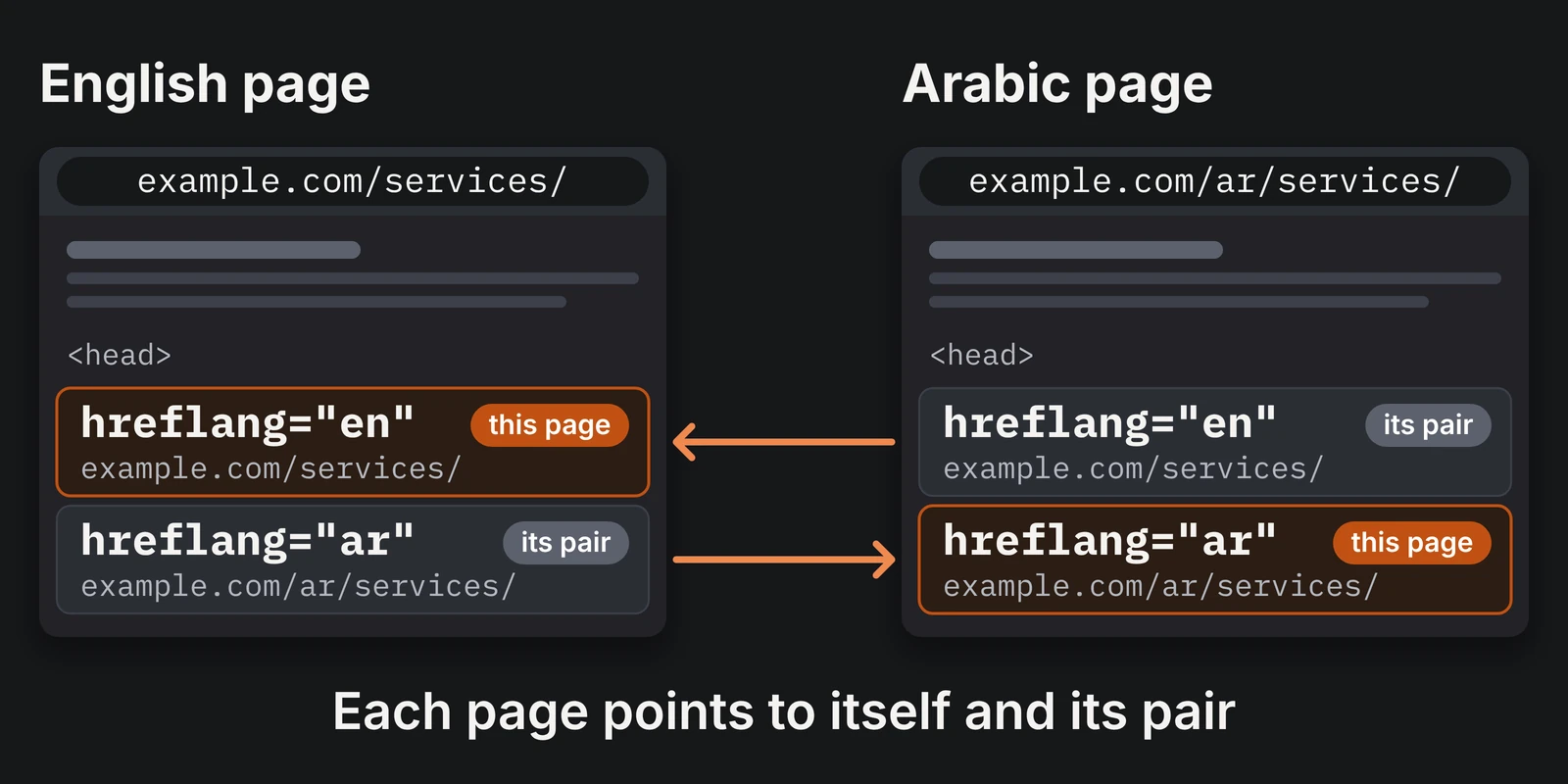
Canonicals and indexing
For pages that use hreflang, Google’s guidance on duplicate URLs says to specify a canonical page in the same language. The Arabic page should therefore canonicalise to itself, not to the English page. The canonical tag is for choosing between duplicates; hreflang is the tool for pointing to translations. Google treats a canonical as a strong signal rather than an instruction.
What is a requirement and what is advice
Much multilingual guidance is worded as a recommendation. Knowing which is which helps you judge trade-offs and quotes.
| Topic | Status | In practice |
|---|---|---|
| hreflang annotations | Recommended | Google may find alternate versions without them, but declaring them is usually best. |
| Pages pointing to each other and to themselves | Needed for the annotations to count | Google says the tags are ignored if two pages do not both point to each other, and each version must list itself. |
| One URL per language | Recommended | Preferred over cookies or browser settings; URL parameters are marked not recommended. |
| Avoiding automatic language redirects | Recommended | Weigh any convenience against the risk that versions are not found. |
| One language per page | Recommended | Mixed pages give a poor experience in results and on the page. |
| Same-language canonical | Recommended | A strong signal, not a command. Google makes the final decision. |
dir="rtl" in the markup | W3C best practice | Declare direction in markup, not only in CSS. |
| WCAG 3.1.1 and 3.1.2 | Standards, Level A and AA | They apply if you target WCAG or must meet it by contract or regulation; 3.1.2 has exceptions. |
| Machine translation | Not prohibited | Google’s spam policy targets scaled, low-value content, not translation as such. |
Localised titles, descriptions and keywords
Write titles and meta descriptions for each language from scratch, based on what people in that language actually type. Arabic queries can vary in spelling, for example with or without hamza or diacritics, and the same idea can be expressed in formal or everyday wording, so check how your customers really write. Use their terms in natural sentences, without repeating a keyword unnaturally. If your business also depends on being found on Google Maps and in local searches, the local SEO checklist for Riyadh businesses covers the local side, including how to handle Arabic and English properly.
Be careful with machine translation at scale
Translation tools can help a human writer work faster. Google’s spam policies on scaled content abuse target many pages generated mainly to manipulate rankings with little value to users, and they list automated transformations such as translating among the examples. The tool is not the issue; the lack of value and the scale are. Have a competent native writer review every page, especially headings, calls to action and anything legal or financial.
Measure each language
In Google Search Console you can filter the Performance report by page URL, for example URLs containing /ar/, to compare how your Arabic and English pages perform. Do not expect immediate results from a new bilingual section. Search visibility builds gradually and depends on many factors, none of which a guide can promise.
Mobile, accessibility and performance
Many visitors will reach your site from a phone, so test both languages at small sizes rather than assuming the English layout carries over. Arabic headings and buttons may wrap differently, long menus may overflow, and the language switcher must stay reachable. At a narrow width such as 375 px, check that:
- Menus open, close and mirror correctly in Arabic
- Buttons and form fields are large enough to tap
- Tables do not force the whole page to scroll sideways
- Contact buttons stay usable without covering content
Two accessibility criteria are directly relevant to bilingual sites. WCAG success criterion 3.1.1 (Language of Page, Level A) requires that the main language of each page can be determined by software. Success criterion 3.1.2 (Language of Parts, Level AA) asks that passages in a different language can be identified too, with exceptions for proper names, technical terms, words of indeterminate language and words that have become part of the surrounding text. In practice this means a correct lang attribute on each page and, where a full phrase in the other language appears, a lang attribute on that phrase so screen readers pronounce it properly.
Also check, in both layouts:
- Contrast and focus order, including keyboard navigation in RTL
- Text size and line height for Arabic body text
- Performance per language. Each version can load different fonts and images, so test them separately
Contact forms, WhatsApp and other contact options
Forms
A form is where interest becomes an enquiry, so it should feel native in each language.
- Translate everything the visitor sees: labels, placeholders, error messages, the thank-you message and any confirmation email.
- Accept real names and numbers. Make sure validation allows Arabic names and Saudi mobile numbers in the formats people actually type.
- Keep phone and email fields left to right even on an Arabic page, or use automatic direction for fields where users may type either language.
- Route notifications correctly, so enquiries from both versions reach someone who can reply in the right language.
- Link to your privacy information from each form, in the matching language.
- Test the whole journey by submitting the form on both versions, on a phone, and checking what arrives.
If your customers already message you on WhatsApp, a WhatsApp button can reduce friction. It works best as one option among several rather than the only one. Offer a phone number, an email address and a form as well, and make sure each is available in both language versions.
Tip
Use the official click-to-chat link format and test it on a real phone. Make the pre-filled message match the page language, list working hours so visitors know when to expect a reply, and make sure someone can actually respond in Arabic and in English. Check also that the button does not cover important content on small screens.
Translation versus localisation
Translation converts words. Localisation adapts the message so it feels written for the audience in the first place. The difference shows in tone, in idioms that do not travel, in the examples you choose, in how services are named, and in whether an image or colour suits your audience.
A workable process:
- Write the source text clearly, avoiding idioms that cannot be rendered naturally.
- Have a native writer adapt it rather than convert it sentence by sentence. For some pages it is better to write the Arabic and English versions separately from the same outline.
- Review in context, on the actual page and layout, because wording that looks fine in a document can break a button or heading.
- Keep a glossary of service names, product names and technical terms, and decide which stay in English, such as widely used brand names, so they remain consistent across the site.
Maintaining two language versions
The launch is the easy part. The common failure is drift: the English page gets a new price or service and the Arabic page does not. Decide up front:
- Who owns each language, and who approves changes
- What triggers an update to both versions: price, opening hours, services, contact details, policies
- How you handle a version that is behind: update it promptly, mark it clearly, or take it offline rather than leave misleading information
- How you monitor each language, including broken links, form submissions and search performance
The launch is the easy part. The common failure is drift.
Maintenance of the technical layer, such as updates, backups and security, applies to the whole site. My WordPress maintenance checklist covers that routine in detail.
Factors that affect the cost of a bilingual website
This guide gives no prices, because projects vary too much, and anyone quoting a fixed price without knowing your requirements is guessing. These factors typically move the cost:
- Number and type of pages, and whether the second language covers all of them or only the core pages
- Content work: who writes, adapts and reviews the Arabic and English text
- Design effort: a properly mirrored RTL design and Arabic typography are additional design and testing work, not a switch
- Functionality: booking, e-commerce, memberships, custom forms or integrations multiply what must be translated and tested
- Tools and licences: some multilingual features, and some combinations such as WooCommerce with a multilingual plugin, may need paid components
- SEO setup: localised metadata, hreflang, sitemaps and measurement for both languages
- Testing: devices, browsers and both directions
- Ongoing maintenance and content updates for two versions
To compare quotes sensibly, make sure each covers the same scope. For a broader look at why website quotes differ, see How Much Does a Small Business Website Cost in Saudi Arabia?. If you are planning an online store, WooCommerce vs Shopify for Saudi businesses explains how the two platforms handle Arabic and English differently.
Common mistakes to avoid
Each of these is explained earlier in this guide. Here they are as consequences.
- A half-finished second language. Translating only the menu and footer, or publishing placeholder pages, leaves visitors and search engines with mixed-language or empty pages.
- Forced language redirects. Some visitors, and Google’s crawler, may never reach the other version.
- Switching language with a cookie on one URL. Google then has no separate address to index for each language.
- Broken hreflang or canonicals. One-way annotations are ignored, and an Arabic page canonicalised to the English page signals that it is a duplicate.
- Flipping the layout with CSS only and ignoring mixed text. Icons, forms, tables and sliders break, and phone numbers and brand names look scrambled.
- Publishing machine translation without review. It damages trust, and at scale it can run into Google’s spam policies.
- Leaving forms, emails and error messages in the wrong language. The visitor’s journey breaks exactly where they are about to contact you.
- No plan for keeping both versions current. One language slowly becomes the unreliable one.
How to choose a bilingual website developer
Ask questions that reveal whether a developer has handled these issues before:
- Can you show live Arabic and English sites you built, and let me test the Arabic version on my phone?
- Who writes and reviews the Arabic text, and what is the process?
- How do you handle URLs, hreflang, canonicals and sitemaps for both languages?
- How do you test right-to-left layouts, mixed-direction content and forms?
- Which theme, builder and multilingual tools do you use, and what are the licence and update implications?
- Who will own the domain, hosting and admin accounts?
- What happens after launch: updates, backups, security and content changes in both languages?
- What do you not promise? Be cautious about anyone who guarantees search rankings.
For a wider checklist of questions to ask any web designer in Riyadh, including portfolio review, quotes, platform choice and ownership, read How to Choose a Web Designer in Riyadh.
Pre-launch quality checklist
Run this on a staging copy or just before publishing, once for English and once for Arabic. Keep your own record of the results for each language.
Structure and search
| Area | What to check |
|---|---|
| Language and direction | Every page has the correct lang; Arabic pages have dir="rtl". |
| URLs | One URL per language, with stable, readable slugs and no parameter-based switching. |
| Language switcher | Visible on every page, links to the equivalent page, and names each language in its own script. |
| Redirects | No automatic redirect that keeps visitors or crawlers from a language version. Test with a different browser language. |
| hreflang and canonicals | Pages point to each other and to themselves, with correct codes and one declaration method; each canonical points to its own page. Check in the page source. |
| SEO metadata | Title and description written for each language, with no mixed-language titles. |
| Sitemap | Published pages in both languages appear, and no placeholder pages. |
Design and content
| Area | What to check |
|---|---|
| Layout | Menus, arrows, sliders, tables and forms mirror correctly in Arabic. |
| Mixed-direction text | Phone numbers, emails, brand names and prices display correctly. |
| Typography | Fonts load; sizes and line height are comfortable; no letter-spacing on Arabic. |
| Numbers, currency and dates | One consistent digit style; currency and dates formatted for the audience. |
| Images | No mirrored text; alt text written in the page’s language. |
| Content parity | The same essential information, prices and policies in both versions. |
Function, access and upkeep
| Area | What to check |
|---|---|
| Mobile | At about 375 px wide, menus work, the page does not scroll sideways, and tap targets are large enough. |
| Accessibility | Contrast, keyboard navigation and focus order in both directions; lang on passages in another language. |
| Performance | Each language tested separately; fonts and images optimised. |
| Forms | Labels, validation, thank-you message and emails in the right language; a test enquiry arrives. |
| Contact options | Phone, email, form and WhatsApp work and match the page language. |
| Caching | Both languages retested after clearing cache and CDN. |
| Ownership | A named owner and update process for each language. |
Planning an Arabic and English website? Let's talk it through
If you are weighing up a bilingual website for your business, it helps to start with questions rather than a template: who your two audiences are, which pages they need first, who will keep the Arabic and English versions up to date, and what a sensible first version looks like for your budget and goals.
If you would like to discuss your requirements, you are welcome to get in touch through the contact page and tell me about your business and your project. There is no obligation, and I will not promise results I cannot verify. I will give you an honest view of what your project involves.
References
Official documentation changes over time, so check the linked pages for their current wording.
- Google Search Central, “Tell Google about localized versions of your page”: https://developers.google.com/search/docs/specialty/international/localized-versions
- Google Search Central, “Managing multi-regional and multilingual sites”: https://developers.google.com/search/docs/specialty/international/managing-multi-regional-sites
- Google Search Central, “Consolidate duplicate URLs”: https://developers.google.com/search/docs/crawling-indexing/consolidate-duplicate-urls
- Google Search Central, “Spam policies” (scaled content abuse): https://developers.google.com/search/docs/essentials/spam-policies
- W3C Internationalization, “Structural markup and right-to-left text in HTML”: https://www.w3.org/International/questions/qa-html-dir.en.html
- W3C WAI, “Understanding SC 3.1.1: Language of Page”: https://www.w3.org/WAI/WCAG22/Understanding/language-of-page.html
- W3C WAI, “Understanding SC 3.1.2: Language of Parts”: https://www.w3.org/WAI/WCAG22/Understanding/language-of-parts.html
- WordPress.org, Polylang plugin page: https://wordpress.org/plugins/polylang/
- Polylang, “How to use DeepL Machine Translation with Polylang Pro”: https://polylang.pro/doc/how-to-use-deepl-machine-translation-with-polylang-pro
- Polylang, “How to translate Elementor with Polylang”: https://polylang.pro/how-to-translate-elementor-with-polylang/
- Polylang, “Detect the browser preferred language”: https://polylang.pro/doc/detect-the-browser-preferred-language/
- Polylang, “Strings translation”: https://polylang.pro/doc/strings-translation/
Frequently asked questions
Is a bilingual website better for SEO?
Not automatically. A bilingual site can help you reach people who search in each language, but only if both versions are properly built, indexable and useful. No structure guarantees rankings.
Do I need hreflang if I have only two languages?
Google presents hreflang as recommended rather than mandatory and may find alternate versions without it. Declaring them is still the clearest way to say which pages are alternates, provided the pages point to each other and to themselves.
Should I redirect visitors to their browser language?
Google advises avoiding automatic redirects based on a guessed language. A visible switcher, with an optional dismissible suggestion, is the safer approach.
Can I translate my site automatically?
A tool can produce a first draft, but a native writer should review every page. Google's concern is scaled, low-value content, not translation itself. If your site uses Elementor, Polylang's documentation says its DeepL integration does not work with Elementor, so those pages are translated by hand anyway.
Do I need every page in both languages on day one?
No. Start with the pages that drive enquiries and keep both versions equally complete. Avoid empty or partial pages in either language.
How do I handle phone numbers and English names in Arabic text?
Test them on the actual page. Keep each number as one unit and isolate inline text of unpredictable direction with suitable markup. The mixed-direction table above has the details.
Will WhatsApp replace my contact form?
Usually not. Some visitors prefer a form or a phone call, so offer several options in both languages.
How long will it take, and what will it cost?
Both depend on scope, content readiness and testing. Anyone who promises a fixed timeline or price before understanding your requirements is guessing.
Related articles
 Web Design
Website Redesign Without Losing Google Rankings: A Safe Plan for Business Owners
Redesigning your business website? A plain, step-by-step plan to keep your Google rankings: what to record, redirect, check at launch and watch afterwards.
Read more → Web Design
10 Signs Your Website Is Outdated: A Plain Check for Saudi Business Owners
Not sure if your business website is outdated? Ten clear signs, a two-minute check for each, and how to choose between small fixes and…
Read more → Web Design
Homepage Design Checklist: 15 Things Every Business Website Should Include
A practical 15-point homepage design checklist — hero messaging, CTAs, trust signals, mobile UX, accessibility, Core Web Vitals and SEO — focused on clarity…
Read more →